
Heat Sheet 101
What is a Heat Sheet? What Does it say?
The Heat Sheet shows all the swimmers participating in the meet and what events they will swim, as well as the heat and lane. The announcer will state the event and heat before each race.
Changes to the Heat Sheet will be made the morning of the meet based on any scratches. Many times, heats may be "combined" to speed up the meet. For example, if we have 3 boys swimming freestyle in the 15-17 age group and 3 girls -- the Clerk of Course and TCOs for the home team can combine them into one heat to save time. The announcer will say if heats are combined. These are usually marked on the heat sheet in advance, but WILL NOT be shown anywhere in the app. Please pay attention when it gets close to the time your swimmer's event is.
What is an event?
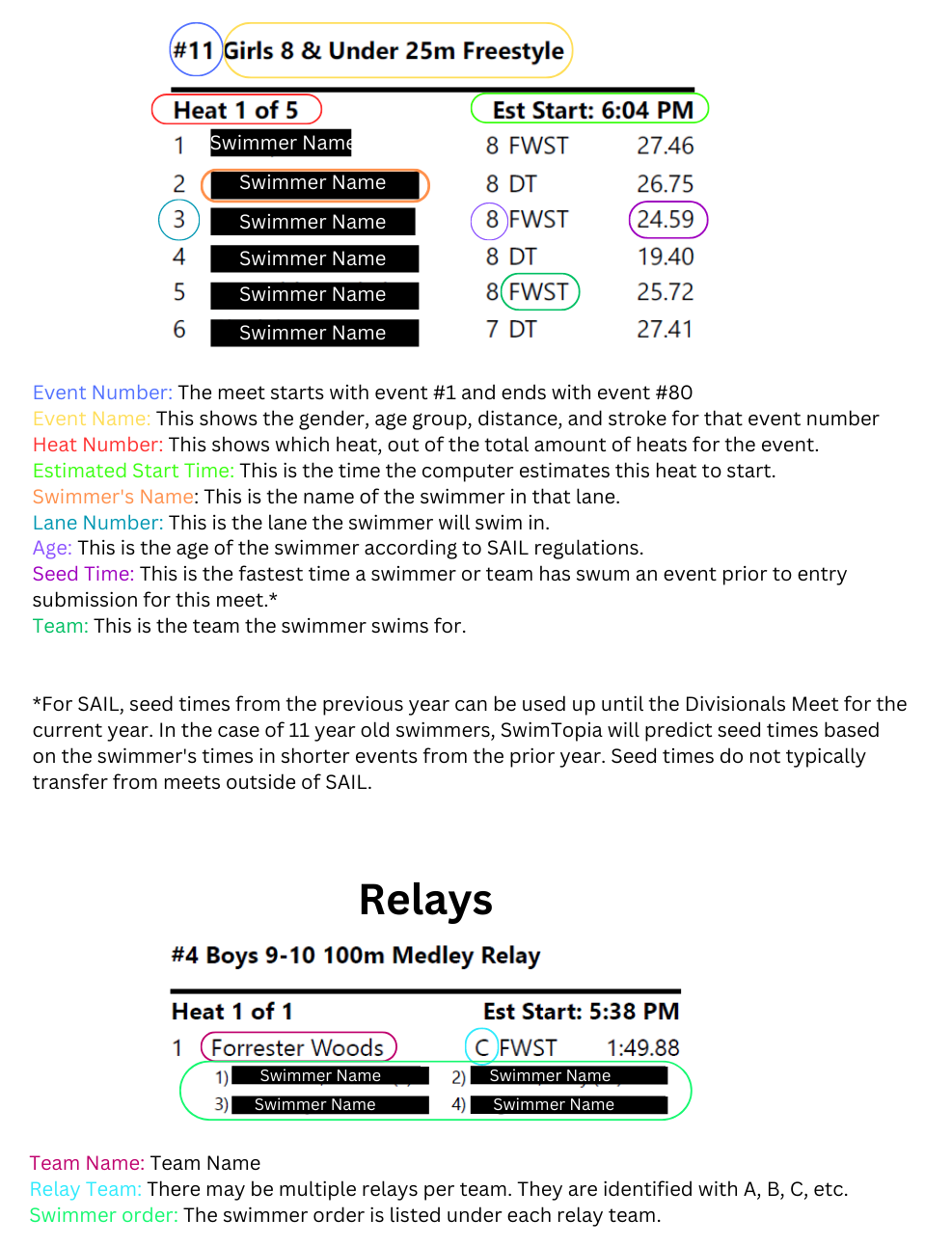
There are 80 events in each meet. Event 1 starts the meet and is the Girls 8&U 100m medley relay. Event 80 ends the meet, and is the Boys 15-18 Boys 200m freestyle relay.
What is a heat?
In each of the 80 events, there are heats. Each heat typically has 6 swimmers - but this may vary depending on the size of the pool at an away meet. For example, if there are 15 swimmers entered in the 25 fly, and the pool has 6 lanes, then there would be 2 heats of 6 swimmers and 1 heat of 3 swimmers.
What is a lane number?
This will tell you which lane your swimmer is scheduled to be in.
What is a seed time?
When a swimmer participates legally in an event, they will have a "seed time" in that event for the next meet. Swimmers are placed in heats and relays according to their seed times*.
* There are exceptions to these rules.
Where can I learn how to read the heat sheet?
See below to learn more about all the pieces of a heat sheet.


Marking Your Swimmer
It is very important to mark your swimmers before the meet! By marking your swimmer’s event/ heat/ lane on their forearm or upper thigh (girls) with a Sharpie marker, your swimmer(s) can keep track of their events and the Tent Parent/Clerk of Course can easily locate where your swimmer needs to be.
The sharpie grid on the skin WITHOUT SUNSCREEN holds up best during the course of a swim meet. Please do not rely on the Tent Parents to mark your swimmer(s).
You can use the SwimTopia app to determine which events your child will be swimming for the upcoming meet. From the home screen, select the name of your child, then select the upcoming meet. You may need to turn your phone sideways to read all of the information. Your screen should look similar to the picture below. Note the event number, heat, lane, and leg position, if the event is a relay.

Sometimes you may be given an Athlete check-in form that lists all swimmers by last name. The event number, heat, lane, and leg position is displayed below.

Swimmer Markup: Using the information above, mark either the swimmer's arm or leg as follows:

Stroke: It is helpful to note the stroke after the lane designation.
- FR = Freestyle
- BA = Back Stroke
- BR = Breast Stroke
- FLY = Butterfly
- IM = Individual Medley
- FRR = Free Relay (All swimmers swim freestyle)
- MR = Medley Relay (Each swimmer swims a different stroke: 1st = back, 2nd=breast, 3rd=fly, 4th=free)
Note: Aerosol sunscreen will remove sharpie.